How to import a RoughAnimator project to Toon Boom Harmony:
1) If you need to transfer the project from your mobile device to your computer:
2) Download this Harmony script (right click & save as) and import it in Harmony's Script Editor window.
Latest update: February 1, 2021

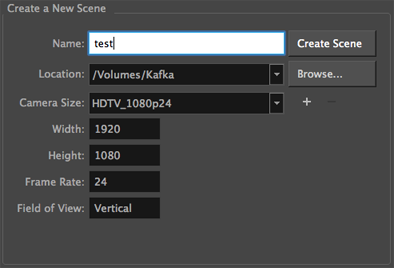
3) Create a new scene with the same size/framerate as your RoughAnimator project.
4) Run the script.


5) Select the project folder; OR if you are unable to select the folder itself, select the "data.txt" file inside.

6) Wait a bit while Harmony imports the images, and then... ta da!

1) If you need to transfer the project from your mobile device to your computer:
- iOS: You can get to the project files through the Files app (they're in a "RoughAnimator" folder), or on the desktop through Finder (or before Catalina, through iTunes).
- Android: On Android 10 and earlier, the files are in a "RoughAnimator" folder in your external storage.
On Android 11 and above the folder is harder to find. I think the location is this, or something like this: /storage/emulated/0/Android/data/com.weirdhat.roughanimator/files But, Android won't give apps other than RoughAnimator permission to access that folder. I believe though that you can get to it from your PC with the Android device plugged into it. There may also be other workarounds like this.
2) Download this Harmony script (right click & save as) and import it in Harmony's Script Editor window.
Latest update: February 1, 2021
3) Create a new scene with the same size/framerate as your RoughAnimator project.
4) Run the script.
5) Select the project folder; OR if you are unable to select the folder itself, select the "data.txt" file inside.
6) Wait a bit while Harmony imports the images, and then... ta da!